
The AI agent & Deploy Gate
JasperNode is an AI-first environment. A built-in agent can read the whole tag tree, write logic, create and configure connectors, run network scans, and help you troubleshoot — all through chat. What makes this safe to use on real machinery is that anything which changes the running process is held at a gate: it is tested before it takes effect, and the changes that would reach into the field wait for a human to sign them off.
Talking to Jasper
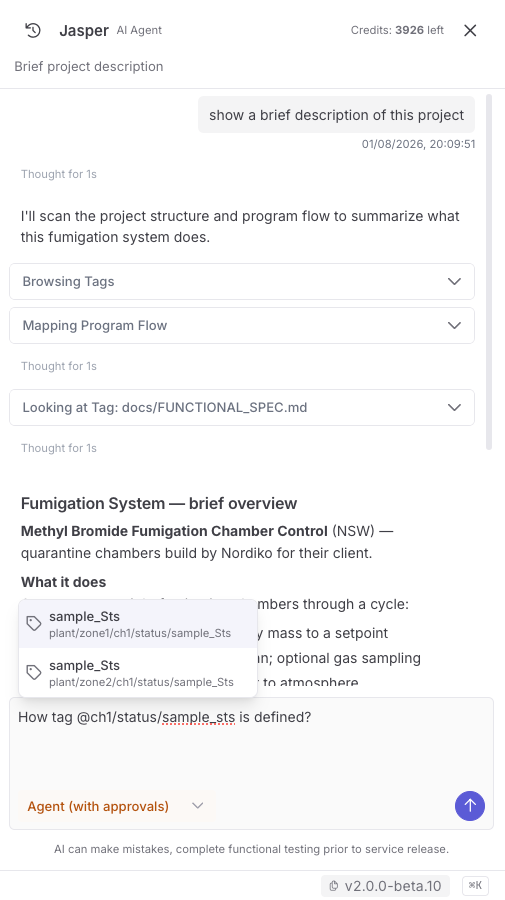
Section titled “Talking to Jasper”The agent is called Jasper. Its panel lives on the right edge of the IDE — the header reads
Jasper, with AI Agent beside it as a descriptor, and the message box prompts you with
“Message Jasper…”. Toggle the panel from the left rail or press ⌘K / Ctrl+K to focus it.
- Describe what you want in plain language: “add a 5-second high-temp alarm on
factory/line1”, “set up MQTT to broker 10.0.0.5 and map the clock topics”, “why didbench_s71200disconnect?” - Reference tags and folders with
@mentions — they deep-link into the tree. - The agent works against the same tag surface you do; it has no private back door into the engine.
Jasper can draw a flow in the chat
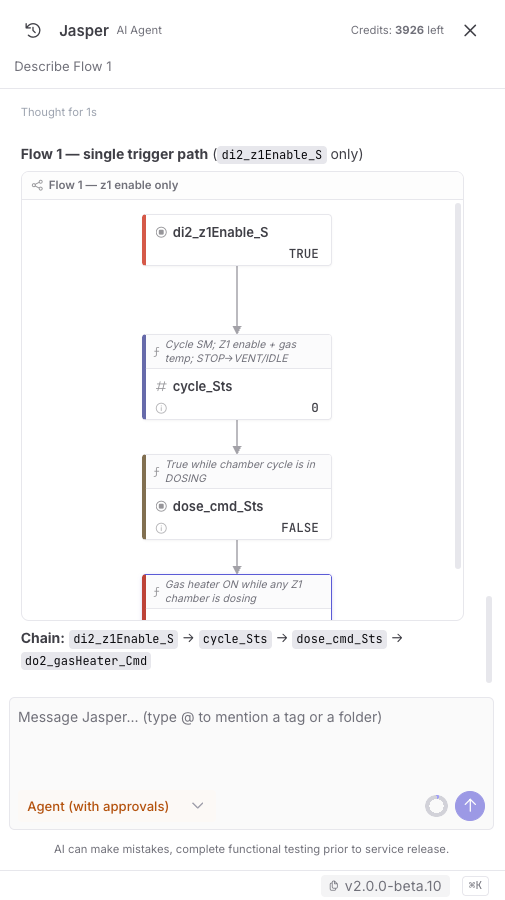
Section titled “Jasper can draw a flow in the chat”Ask “show me what drives factory/line1/alarm” and Jasper can answer with a live flow diagram
drawn inline in the conversation — the same chips, edges and logic strips as
Flow Exploration, rendered right in the
reply.
These in-chat diagrams are live but disposable:
- Live — the chips subscribe to the real tags, so values tick and flash as the process runs, and the edges come from the actual deployed wiring (solid = a trigger, dashed = a read-only input).
- Read-only — there is nothing to click, grow, or remove. It is a picture for the conversation, not an editor.
- Disposable — nothing is saved. No tab appears in Flow Exploration and no approval is involved, because drawing a diagram changes nothing. Ask for it as a saved flow if you want to keep it.
Each script’s description shows on its chip here always, so a drawn flow reads as an explanation rather than a bare graph. Very large graphs aren’t drawn in chat — Jasper will say the flow is too large and suggest a saved flow instead.
Read-only vs. process-affecting
Section titled “Read-only vs. process-affecting”The agent’s actions come in two flavours:
- Read-only investigation — browsing tags, reading scripts, summarising status, running a network scan. These run freely; nothing about the process changes.
- Process-affecting changes — writing a script, enabling a connector, deleting a tag. These are gated. The agent proposes the change, the runtime tests it in an isolated fork, and anything that would start driving the field waits for your explicit approval.
You always see each tool call the agent wants to make. Process-affecting ones surface as an approval card with the proposed change and its test result.
The Deploy Gate
Section titled “The Deploy Gate”Process-affecting AI changes move through a small state machine:
pending ─▶ tested ─▶ awaiting-approval ─▶ approved ─▶ deployed- tested — the runtime runs the proposed change in an isolated fork of the engine against test values; the fork can never leak into the live process. A change that fails its test never reaches the next step.
- awaiting-approval — the agent stops and shows you a Deploy Gate card: the proposed change, the test report, and Approve / Reject. Approve is disabled if the test failed; rejecting takes a reason.
- approved → deployed — on approval the change flips live atomically — the script and its inputs change together, between cycles, as one unit — and the transition is recorded.
Your own edits in the Tag Tree are not forced through this gate — it exists to constrain AI agency and to produce an audit trail of what the agent changed and who agreed to it.
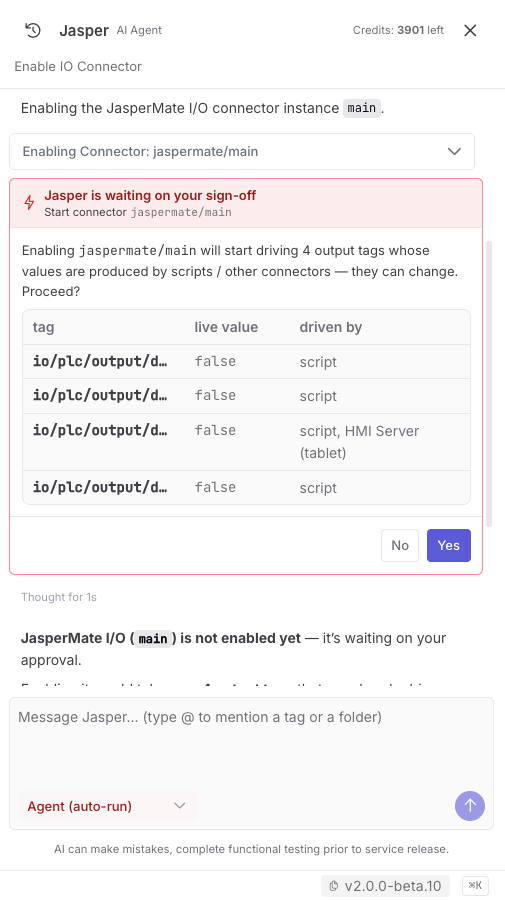
What always stops for sign-off is an action that reaches into the field. Enabling a connector that
drives an out tag is the clearest case: on enable the connector cold-starts and writes the
commanded value straight to a physical output, so the agent spells out exactly which tags would
start being driven, and what is producing their values, before waiting on your Yes.
Guardrails on AI changes
Section titled “Guardrails on AI changes”Beyond the gate, every AI action passes through a set of hard rules the agent cannot talk its way around. The initial set includes:
- Read a script before modifying it.
- Refuse to delete a tag that other scripts depend on.
- Refuse to delete or rename a tag an enabled connector is driving (disable the connector first).
- Require sign-off before enabling a connector that would start driving outputs.
- Refuse to deploy a script that loops without yielding (no
await fn.sleep(...)/fn.timerOn).
These rules are checked on every relevant action, are auditable, and grow as the team encounters new cases.
Identity, roles and the audit trail
Section titled “Identity, roles and the audit trail”- Sign-in is via the JasperX cloud — there are no local accounts. The first editor to register a node owns it and invites others.
- The current role is Editor (full edit plus the AI agent). A read-only Viewer role and presence indicators for multiple concurrent editors are planned for later releases. Today, multiple editors may work at once with last-writer-wins on a tag.
- Every gate transition and human approval is written to an activity log kept alongside the tag database. Together with the gate, atomic deploy and safety/non-safety segregation, this audit trail is what makes JasperNode auditably safer at the supervisory layer — though, to be clear, the runtime is not yet safety-certified (see JasperNode vs. a PLC → where a PLC is ahead).
In practice
Section titled “In practice”A typical loop while building: ask the agent to draft logic or a connector → review the proposed change and its test result → approve it → watch it run on live values → iterate. You stay in control of every change that touches the process, while the agent does the legwork of reading the tree, writing the code, and wiring up the dependencies.